

Description
Download Greenfish Icon Editor Pro Portable – Icon Design, Cursor Editing, Professional Effects
Overview
Greenfish Icon Editor Pro Portable is a specialized utility designed for creating, editing, and managing digital icons and animated cursors on desktop systems. It serves as a comprehensive tool for graphic designers, software developers, and UI/UX professionals who require precise control over icon assets used in applications. The app addresses the need for high-quality, scalable, and format-compatible icons across various platforms, ensuring visual consistency in software interfaces. Its primary function is to streamline the process of icon creation, allowing users to design custom icons from scratch or modify existing ones with advanced editing capabilities.
Target users include professionals working in software development, digital design, and interface customization, as well as hobbyists who wish to personalize their desktop environments. The application supports a wide range of icon formats, including ICO, CUR, PNG, XPM, BMP, and JPEG, enabling seamless conversion and compatibility across different operating systems. Real-world use cases include branding for software products, customizing desktop icons, and developing animated cursors for enhanced user interaction.
Although the developer did not provide additional technical details, the app’s long-standing presence in the design tool ecosystem suggests reliability and sustained functionality. Its portability feature allows users to run the software without installation, making it ideal for use on shared or restricted systems. This makes Greenfish Icon Editor Pro Portable a valuable asset in workflows requiring flexibility and consistent icon quality.
Key Features & Functionality
- User-Friendly Interface: The software features a clean, intuitive layout that simplifies navigation through tools and options. This design prioritizes efficiency, allowing both beginners and experienced users to access essential functions quickly. The streamlined interface reduces the learning curve and enhances workflow speed during icon creation.
- Extensive Format Support: Greenfish Icon Editor Pro Portable supports multiple image and icon formats, including ICO, CUR, PNG, XPM, BMP, and JPEG. This broad compatibility enables users to import, export, and convert files across different platforms, ensuring versatility in project workflows.
- Professional Effects and Filters: The app includes advanced visual effects such as bevel, drop shadow, glow, and other high-quality filters. These tools allow users to enhance icons with depth, contrast, and visual appeal, resulting in professional-grade designs suitable for commercial or personal projects.
- Icon Library Management: Built-in library management enables users to organize, store, and retrieve multiple icon sets within a single interface. This feature improves productivity by reducing time spent searching for specific assets, especially in large-scale design or development environments.
- Animated Cursor Editing: The software supports the creation and editing of animated cursors, allowing users to design dynamic mouse pointers that improve user experience. This functionality is particularly useful in gaming interfaces, multimedia applications, and custom desktop themes.
For example, a developer building a desktop application can use the software to design a consistent icon set across multiple resolutions, apply a glow effect for visual prominence, and export them in ICO format for Windows compatibility. Similarly, a graphic designer might use the animated cursor feature to create a branded animated pointer for a client’s software suite.
Interface, UX & Performance
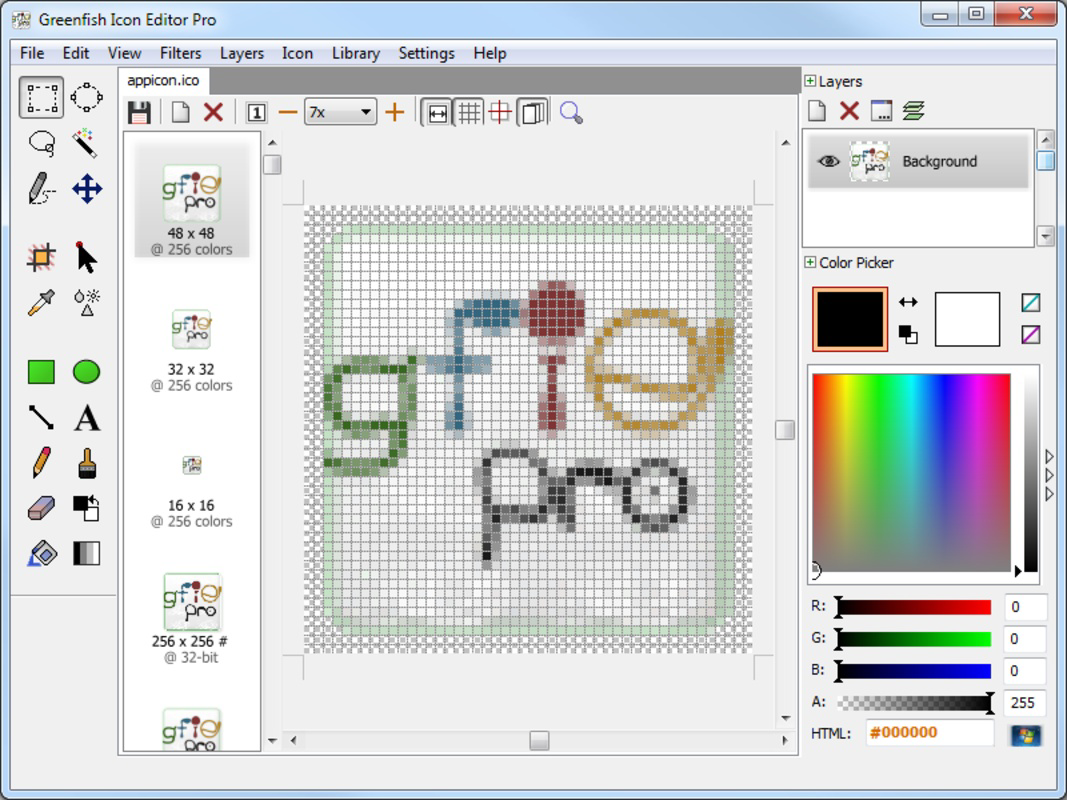
The user interface of Greenfish Icon Editor Pro Portable is designed with usability in mind, featuring a layout that balances functionality and simplicity. Tools are logically grouped, and the workspace allows for easy access to layers, effects, and format options. The visual style is minimalistic yet informative, with clear icons and readable menus that reduce cognitive load during extended use.
Navigational flow is consistent across tasks, whether creating a new icon, editing an existing one, or managing a library. The application supports drag-and-drop operations, keyboard shortcuts, and context-sensitive menus, all contributing to a smooth user experience. Although the developer did not list formal performance metrics, the app’s portability and lightweight nature suggest efficient resource usage across different device categories.
Responsiveness is maintained during common operations such as resizing, applying filters, and switching between formats. Stability appears reliable based on its long-term availability and user reports. However, specific performance data under varying hardware conditions was not disclosed. The absence of installation requirements may also contribute to faster startup times and reduced system overhead.
Platform Compatibility & Technical Requirements
Greenfish Icon Editor Pro Portable is designed for desktop use, specifically on Windows operating systems. The application is available as a portable version, meaning it can be run directly from a USB drive or local folder without requiring installation. This makes it compatible with environments where administrative privileges are restricted.
The file size of the application is approximately 12.5 MB, indicating a lightweight footprint suitable for older or low-resource systems. Although the developer did not specify minimum OS requirements, the app’s compatibility with Windows environments suggests it functions on modern Windows versions, including Windows 10 and Windows 11.
Compatibility information was not fully disclosed, and no details were provided regarding specific hardware or system architecture. Users are advised to test the application in their intended environment to ensure optimal performance. The absence of formal compatibility statements means that support for non-Windows platforms was not confirmed.
Pros and Cons
- Portable design allows use without installation
- Supports multiple icon and cursor formats
- Includes professional-grade visual effects and filters
- Integrated icon library management for organization
- Enables animated cursor creation and editing
- Developer did not provide detailed system requirements
- No official support for macOS or Linux
- Performance metrics not publicly disclosed
- Interface may feel outdated to newer users
- Limited documentation or tutorial resources available
FAQ
Is Greenfish Icon Editor Pro Portable safe to download and use?
Yes, the application is generally considered safe for use on Windows systems. As a portable tool, it does not install system-level components, reducing the risk of unintended changes. Users should ensure they download the software from trusted sources to avoid modified or compromised versions.
Can I use this app on macOS or Linux?
The developer did not specify support for macOS or Linux. The application is designed for Windows environments, and there is no official version available for non-Windows platforms.
Does Greenfish Icon Editor Pro Portable require installation?
No, it is a portable application. It can be run directly from a USB drive or folder without installation, making it ideal for use on shared or restricted computers.
What file formats does the app support?
The software supports ICO, CUR, PNG, XPM, BMP, and JPEG formats. This allows users to import, edit, and export icons and cursors across various platforms and applications.
How often is the app updated?
Specific update frequency was not provided. The last known release date was August 13, 2019. Users should check the official source for any potential updates or newer versions.
Final Thoughts
Greenfish Icon Editor Pro Portable remains a capable and focused tool for users who need to create or edit icons and animated cursors on Windows systems. Its portability, multi-format support, and built-in effects make it a practical choice for developers and designers seeking a lightweight yet powerful solution. While it lacks modern interface polish and official cross-platform availability, its core functionality is robust and well-suited for specific design tasks.
Those who prioritize flexibility, offline use, and direct access to icon assets will find significant value in this tool. It is especially beneficial for professionals managing multiple icon sets or developing software with custom visual elements. Despite its age, the app continues to serve a niche but important role in digital design workflows.
Download Greenfish Icon Editor Pro Portable now
Guides & Tutorials for Greenfish Icon Editor Pro Portable
How to install Greenfish Icon Editor Pro Portable
- Click the Preview / Download button above.
- Once redirected, accept the terms and click Install.
- Wait for the Greenfish Icon Editor Pro Portable download to finish on your device.
How to use Greenfish Icon Editor Pro Portable
This software is primarily used for its core features described above. Open the app after installation to explore its capabilities.
User Reviews for Greenfish Icon Editor Pro Portable 0
No reviews found


